Search

This site uses cookies
By clicking “Accept,” you agree to the storing of cookies on your device to enhance site navigation, analyze site usage, and assist in our marketing efforts. View our Privacy Policy for more information.


A busy pharmacy isn’t necessarily an inefficient pharmacy.
Prescription volume, phone calls, insurance issues, and patient questions are part of the job. The real problem begins when work repeatedly stops in the same place.
A prescription waits in the wrong queue. A technician re-enters information that already exists elsewhere. A rejected claim interrupts routine filling. A patient calls for an update that could’ve been sent automatically. None of these delays seems overwhelming on its own, but repeated dozens or hundreds of times, they can consume hours of staff time.
These bottlenecks in pharmacy operations also affect more than speed. They can increase frustration, make workloads harder to predict, delay prescriptions, and leave pharmacists with less time for counseling and clinical services.
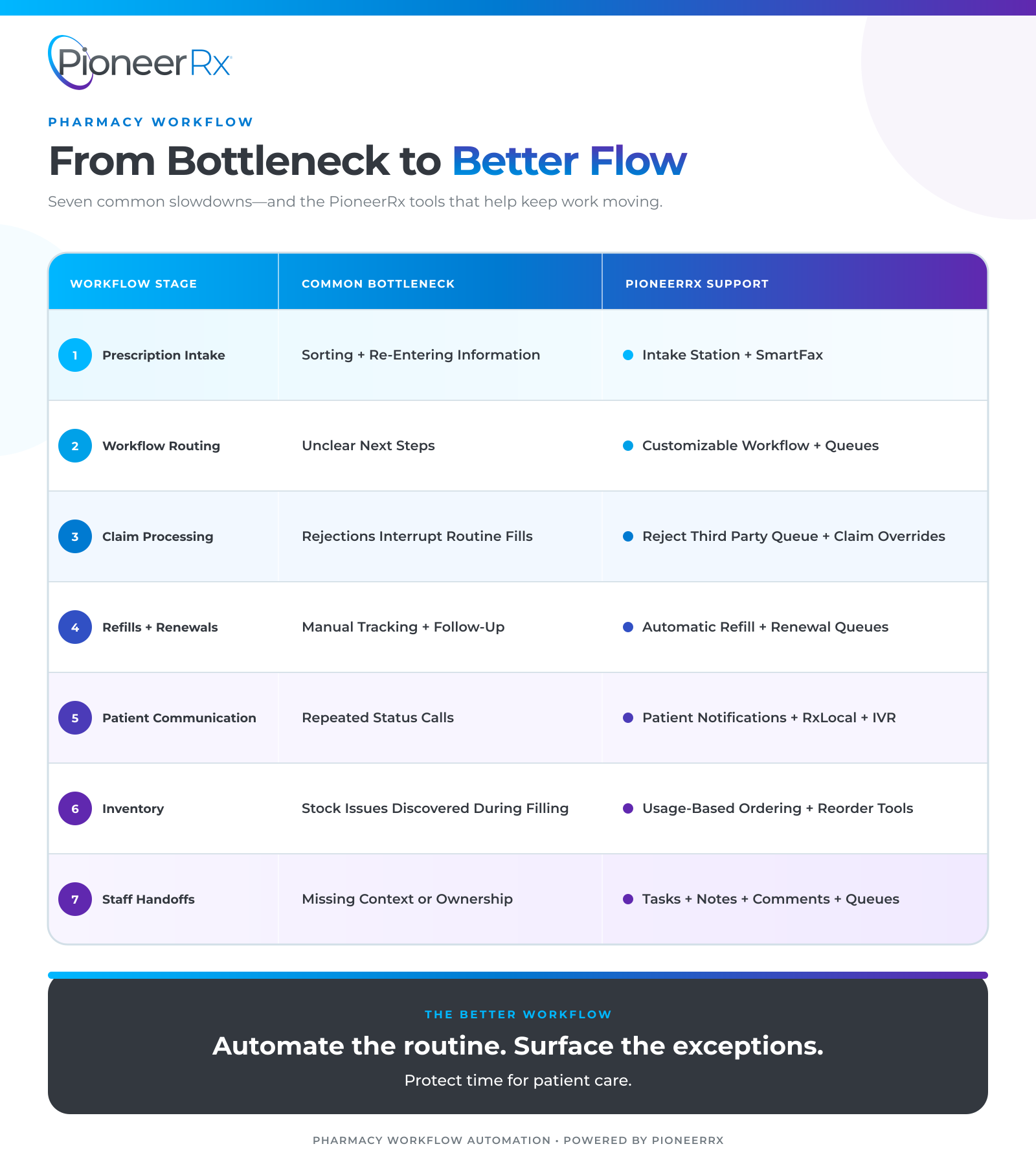
Improving pharmacy workflow starts with identifying where work slows down, why the slowdown keeps happening, and whether the right pharmacy process automation can remove unnecessary steps. Here are seven common places independent pharmacies lose time, and how PioneerRx can help keep work moving.
Prescriptions can arrive through e-prescribing, fax, phone, paper, or transfer. If each source follows a different manual process, staff may spend valuable time sorting documents, locating patient profiles, re-entering information, and deciding where each prescription belongs.
The bottleneck becomes more noticeable when a patient arrives earlier than expected, or a prescription gets buried in a physical stack. Staff may know the prescription entered the pharmacy, but they can’t immediately see its status or who’s handling it.
The PioneerRx Intake Station helps pharmacies organize prescription intake before filling begins. Staff can scan prescriptions at one workstation, attach them to the appropriate patient, and place them into the pharmacy workflow process for another user to access.
For pharmacies receiving prescriptions by fax, SmartFax can identify incoming prescription documents, attach them to patient profiles, and sort them into the PioneerRx workflow. Reducing manual intake steps gives the team a more consistent starting point.
Every independent pharmacy operates differently. A high-volume retail pharmacy may need a different workflow than a pharmacy focused on compounding, medication synchronization, delivery, long-term care, or clinical services.
When software forces every prescription through the same rigid path, staff may develop workarounds. They create handwritten notes, move baskets between stations, or rely on memory to determine what happens next. Those workarounds make the process harder to follow and easier to disrupt.
PioneerRx’s Customizable Workflow allows pharmacies to add, remove, and modify workflow steps around their operations. Queues can give prescriptions a defined place to wait when they need inventory, clarification, renewal, insurance follow-up, or another action.
A clear queue doesn’t complete the work for the pharmacy. It makes the next step visible so the right team member can act without starting the search over again.
A claim rejection requires attention, but it shouldn’t stop unrelated prescriptions from moving forward. Without a defined process, technicians may repeatedly open prescriptions, interpret reject messages, search for previous submission details, and ask another staff member what to try next.
That interruption creates two delays: the rejected claim remains unresolved, and routine prescriptions wait while staff troubleshoot it.
PioneerRx’s Reject Third Party Queue gives pharmacy teams real-time visibility into claim issues. Staff can review the rejected code, message, and previous submission information without repeatedly opening the prescription. The system’s Claim Overrides feature can also help users apply the appropriate override information when a rejection meets established conditions.
These tools keep exceptions visible while allowing the rest of the workflow to continue. The pharmacy can address the problem without letting one rejection become a bottleneck for the entire fill queue. Learn more in these PioneerRx workflow tips.
Manually tracking maintenance refills can involve calendars, reminder lists, phone calls, and repeated profile reviews. Prescription renewals add another layer, particularly when a medication synchronization cycle is approaching, and the prescription doesn’t have enough quantity remaining for the next fill.
This work is predictable, which makes it a good candidate for pharmacy workflow automation.
PioneerRx’s Integrated Automatic Refill tools can place eligible prescriptions on the pharmacy’s to-do list when they’re due. Renewal queues can help staff monitor requests and identify synchronized prescriptions that may need prescriber authorization before the next cycle.
Automation can surface the work at the appropriate time, but pharmacy staff still review each prescription, confirm patient needs, and apply their professional judgment before filling.
Patients need timely information, but routine questions can interrupt data entry, verification, counseling, and checkout. A series of short calls asking whether prescriptions are ready can fragment the team’s attention throughout the day.
The answer isn’t to make communication less personal. It’s to automate predictable updates, so staff have more time for conversations that require individual attention.
PioneerRx Patient Notifications can send prescription alerts and other updates using the patient’s preferred contact information. The RxLocal app allows patients to request refills, review prescription information, receive reminders, and exchange secure messages with the pharmacy. Integrated IVR options can also handle common refill and status requests without requiring staff to answer every call.
Together, these pharmacy process automation tools can reduce avoidable interruptions while keeping patients informed.
Finding out that a medication is unavailable after a prescription enters the fill process creates extra work. Staff may need to check alternate package sizes, contact a wholesaler, arrange a partial fill, transfer the prescription, or explain the delay to the patient.
Although shortages can’t always be avoided, inventory tools can reduce delays caused by preventable ordering gaps.
PioneerRx offers usage-based ordering, automatic reorder points, recommended ordering, and support for multiple wholesalers and inventory groups. These tools use pharmacy data and predefined settings to help staff identify what may need to be ordered before the balance on hand becomes a problem.
The pharmacy still controls purchasing decisions, but the system can reduce the need to monitor every item manually. Explore additional PioneerRx inventory features.
Work often slows down between people rather than within a single task. A technician notices an unusual day supply, a claim needs another review, or a patient requires follow-up—but the person who identified the issue can’t resolve it immediately.
If the handoff depends on a sticky note or verbal reminder, the next staff member may not know what was already reviewed or why the prescription stopped.
PioneerRx tasks, notes, comments, and customizable queues can preserve that context. A linked task can direct another user back to the relevant prescription, while completion notes create a record of what was done. This gives each exception an owner and a visible next step.
Better handoffs don’t just save time. They reduce duplicated work and make it easier for team members to pick up where someone else left off.
Automation is most useful when a task is repetitive, rules-based, and performed frequently. Refill scheduling, status notifications, queue routing, document sorting, and inventory recommendations are strong examples because each can consume small amounts of time throughout the day.
The goal of automation in a pharmacy isn’t to remove the pharmacist from the process. It’s to handle routine movement and surface exceptions so pharmacists can spend more time on clinical review, patient questions, and decisions that require professional judgment.
When evaluating a bottleneck, ask:
These questions can help your pharmacy prioritize changes instead of trying to automate everything at once.
Pharmacy software can improve prescription workflows when it connects intake, data entry, claims, filling, verification, communication, inventory, and reporting within a configurable process. It should help teams see where every prescription stands and separate routine work from exceptions requiring attention.
PioneerRx pharmacy software supports customizable workflow stations, queues, automation tools, mobile applications, inventory management, and integrations designed for independent pharmacies. Because workflows can be adjusted around a pharmacy’s services and staffing model, teams can focus on the bottlenecks that matter most to their operation.
There isn’t one universal answer for every pharmacy. The best pharmacy software for automating operations is the system that supports your prescription volume, services, staff, patients, and plans for growth.
When comparing systems, look for configurable workflows, visible queues, refill automation, integrated patient communication, inventory tools, reporting, mobile capabilities, and connections to trusted vendors. Just as importantly, determine whether the provider offers training and support to help your team configure and use those features effectively.
A long feature list has limited value if the tools don’t fit the way your pharmacy works.
Improving pharmacy workflow doesn’t require rebuilding every process at once. Start with the delay your team encounters most often. Measure how frequently it occurs, identify the manual steps involved, and determine whether your existing PioneerRx tools can simplify the process.
A few well-planned changes can make the day more predictable, give staff clearer responsibilities, and create more time for patient care.
Ready to see how PioneerRx can support your pharmacy workflow process? Request a PioneerRx demo to explore its customizable workflow, automation, inventory, communication, and reporting capabilities.


